
For most students, I’d start with the AmScope B120 Series: its binocular compound-microscope format and included camera suit lessons focused on prepared slides. The TOMLOV DM301 Pro is a stronger fit for group viewing on a built-in screen, while the PalliPartners Compound Microscope suits learners who want a conventional eyepiece-based setup. The main choice is between a microscope designed for transparent specimens and a screen-based model better suited to larger, opaque objects. Magnification claims alone do not tell you which one will teach more effectively. Read on for how all 11 options compare and which student each one best serves.

Get school and study supplies delivered free — and shop member deals
- Fast, free delivery on millions of items
- Access to Prime Big Deal Days deals on October 6–7
- Prime Video, Amazon Music and more included
Key Takeaways
- The AmScope B120 Series is the leading all-around classroom choice because it combines binocular viewing with a 5MP camera, rather than relying only on a small built-in screen.
- The TOMLOV DM301 Pro favors shared viewing: its 7-inch display is easier for a student group to gather around than the smaller screens on the OOZSTAR and Elikliv models.
- Compound microscopes and digital inspection microscopes serve different lessons. The Sino Optical XSP-81, PalliPartners, and Woehrsh are aimed at slide-based work; the coin-style TOMLOV and Elikliv models suit opaque samples better.
- Very high advertised magnification is not a substitute for usable detail. Illumination, focus control, stage movement, and specimen type matter more to learning than a large maximum number.
- Specialized features bring narrower use cases. The Woehrsh adds a mechanical stage and trinocular design for advanced lab work, while the TOMLOV DM4W Max’s weighing scale is most relevant to coin or small-object projects.
| PalliPartners Compound Microscope for Adults and Students |  | Best for Traditional Slide Study | Magnification: 100X–2000X | Objective lenses: 4X, 10X, 40X | Eyepiece: WF25X | VIEW LATEST PRICE | See Our Full Breakdown |
| BMDSAE 1000X Handheld Digital Microscope for Kids with 2-Inch IPS Screen |  | Best for Portable Beginner Exploration | Magnification: Up to 1000X | Display: 2-inch IPS | Camera: 2MP | VIEW LATEST PRICE | See Our Full Breakdown |
| TOMLOV DM301 Pro Digital Microscope with 7-Inch Screen |  | Best for Classroom Sharing | Display: 7-inch IPS screen | Magnification: Up to 1200x | Lenses: Three achromatic lenses | VIEW LATEST PRICE | See Our Full Breakdown |
| Sino Optical XSP-81 Compound Microscope, 40x–2000x, with Dual LED Lighting |  | Best for Hands-On Optics Practice | Magnification: 40x–2000x | Objective lenses: 4x, 10x, 40x achromatic | Eyepieces: WF10x and WF25x | VIEW LATEST PRICE | See Our Full Breakdown |
| OOZSTAR Digital Microscope with 4.3-Inch Display and 5 MP Camera |  | Best for Ready-to-Use Home Study | Maximum magnification: 2500x | Listed magnification settings: 100x, 250x, 1000x, 200x, 500x, 2000x | Eyepieces: WF10x and WF16x wide-angle | VIEW LATEST PRICE | See Our Full Breakdown |
| Microscope 40X-2500X Magnification with 4.3-inch Display, Wide-Angle 10X and 25X Eyepieces, Built-in 5-Megapixel Camera for School Labs (Black) | 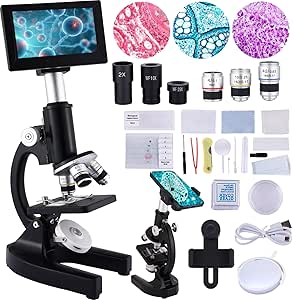 | Best for Flexible Classroom Use | Magnification range: 40X–2500X | Display: 4.3-inch HD display | Camera: 5MP built-in camera | VIEW LATEST PRICE | See Our Full Breakdown |
| TOMLOV DM301 Max Digital Microscope |  | Best for Shared Screen Viewing | Display: 7-inch IPS screen | Magnification: Up to 1200X | Image capture: 8MP | VIEW LATEST PRICE | See Our Full Breakdown |
| AmScope B120 Series LED Binocular Compound Microscope with 5MP Camera |  | Best for Traditional Lab Work | Model: B120C-E5 | Magnification: 40X–2500X | Camera: 5MP USB microscope camera | VIEW LATEST PRICE | See Our Full Breakdown |
| Elikliv EDM4 Digital Coin Microscope with 4.3-Inch Display |  | Best for Inspecting Everyday Objects | Model: EDM4 | Display: 4.3-inch LCD, 720p HD | Magnification: Up to 1000x; actual magnification varies | VIEW LATEST PRICE | See Our Full Breakdown |
| Woehrsh Trinocular Compound Microscope, 40X–5000X, with Mechanical Stage and USB Camera |  | Best for Advanced Student Lab Setups | Microscope type: Compound trinocular | Magnification: 40X–5000X | Objective lens: 195 achromatic | VIEW LATEST PRICE | See Our Full Breakdown |
| TOMLOV DM4W Max Digital Coin Microscope with Weighing Scale, 7-Inch Screen |  | Best for Coin and Small-Object Projects | Brand and model: TOMLOV DM4W Max | Screen: 7 inches; 800 × 480 resolution | Video resolution: 2K | VIEW LATEST PRICE | See Our Full Breakdown |
| digital microscopes for student | Magnification | Display | Lighting |
|---|---|---|---|
| PalliPartners Compound Microsc | 100X–2000X | — | — |
| BMDSAE 1000X Handheld Digital | Up to 1000X | 2-inch IPS | 8 adjustable LEDs with 3 brightness modes |
| TOMLOV DM301 Pro Digital Micro | Up to 1200x | 7-inch IPS screen | Adjustable dual LED lighting |
| Sino Optical XSP-81 Compound M | 40x–2000x | — | Adjustable upper and lower dual LED |
| OOZSTAR Digital Microscope wit | — | 4.3-inch | — |
| Microscope 40X-2500X Magnifica | — | 4.3-inch HD display | — |
| TOMLOV DM301 Max Digital Micro | Up to 1200X | 7-inch IPS screen | Adjustable top and bottom LED lights |
| AmScope B120 Series LED Binocu | 40X–2500X | — | — |
| Elikliv EDM4 Digital Coin Micr | Up to 1000x; actual magnification varies | 4.3-inch LCD, 720p HD | 8 adjustable LED lights |
| Woehrsh Trinocular Compound Mi | 40X–5000X | — | LED |
| TOMLOV DM4W Max Digital Coin M | — | — | — |
More Details on Our Top Picks
PalliPartners Compound Microscope for Adults and Students
I’d choose the PalliPartners for students whose assignments center on prepared slides and hands-on compound microscopy. Its 4X, 10X, and 40X objectives, paired with a 25X eyepiece and 2X additional lens, provide a broad stated magnification range, while top and bottom LEDs let students adjust lighting for different specimens. The included slides, phone adapter, and Bluetooth shutter give learners a practical way to start observing and save images. Compared with the BMDSAE handheld microscope, this is a less portable setup, but it offers a more conventional microscope format for sustained slide work. The tradeoff is that photography depends on a compatible phone rather than a built-in screen, and its educational feature set is not aimed at professional lab work. Younger students will need adult guidance.
Pros:- Top and bottom adjustable LEDs support both transparent and opaque specimens.
- Coaxial coarse and fine focus controls suit step-by-step slide viewing.
- Includes prepared and blank slides for immediate practice.
- Phone adapter and Bluetooth shutter support specimen photography.
Cons:- Requires a separate smartphone for digital viewing and image capture.
- Less convenient to carry than the BMDSAE handheld model.
- Basic-to-intermediate educational capabilities are not intended for advanced professional work.
Best for: Students learning to prepare and inspect slides at home or in a classroom, especially those who want phone-based specimen photos.
Not ideal for: Students who need a self-contained screen, a highly portable field microscope, or professional laboratory performance.
- Magnification:100X–2000X
- Objective lenses:4X, 10X, 40X
- Eyepiece:WF25X
- Additional lens:2X
- Illumination:Adjustable top and bottom LED
- Focus:Coaxial coarse and fine focus
- Included slides:10 prepared and 18 blank
- Digital accessories:Phone clip adapter and Bluetooth camera shutter
Our verdict“Choose the PalliPartners if slide-based learning matters more than portability or a built-in display.”
BMDSAE 1000X Handheld Digital Microscope for Kids with 2-Inch IPS Screen
The BMDSAE handheld microscope is the easiest pick here for a student who wants to inspect objects away from a desk. Its 2-inch IPS screen shows the live view without a phone or computer, and the 200g body and included lanyard make it easier to carry outdoors than the larger TOMLOV DM301 Pro. Adjustable LEDs help with uneven lighting, while onboard storage can hold photos and AVI videos for later sharing. Its role is quick, exploratory viewing rather than a full slide-study setup: manual focus takes practice, and the 2MP camera and small screen offer less room for group viewing or detailed image review than the TOMLOV’s 7-inch display. The battery is rated for up to two hours, so longer study sessions may need a recharge. I’d favor it for short, supervised discoveries, not extended classroom demonstrations.
Pros:- Built-in 2-inch IPS screen allows standalone viewing.
- Lightweight 200g body and lanyard suit portable exploration.
- Eight adjustable LEDs offer three brightness modes.
- Stores photos and AVI videos internally.
Cons:- Battery life is limited to up to two hours per charge.
- Manual focus can take practice, particularly for younger users.
- The 2MP camera and small screen are less suited to detailed group viewing than the TOMLOV DM301 Pro.
Best for: Young students and families who want a lightweight microscope for short outdoor or at-home exploration without relying on a phone.
Not ideal for: Students who need long sessions, a large shared classroom display, or a conventional compound microscope for systematic slide study.
- Magnification:Up to 1000X
- Display:2-inch IPS
- Camera:2MP
- Lighting:8 adjustable LEDs with 3 brightness modes
- Battery:600mAh; up to 2 hours
- Storage:32M; supports 200+ photos or AVI videos
- Weight:200g
- Connectivity:USB-C
Our verdict“Pick the BMDSAE for portable, self-contained discovery sessions, but choose a larger-screen microscope for class demonstrations.”
TOMLOV DM301 Pro Digital Microscope with 7-Inch Screen
For students who learn by discussing what everyone can see, the TOMLOV DM301 Pro has the strongest shared-viewing setup in this group. Its 7-inch adjustable-angle IPS screen is far easier to gather around than the BMDSAE’s 2-inch display, and TV, computer, and projector connections can extend that advantage to a class. The 8MP photo capture, 1080p video, and Wi-Fi app viewing give students several ways to document or share observations. Prepared and blank slides plus a carrying case also make it a more ready-to-use teaching kit than the PalliPartners compound microscope. The tradeoff is less convenience for quick, unplugged exploration: battery life reaches up to three hours, and the larger screen setup is not as pocketable as a handheld model. I’d select it for demonstrations and collaborative study, not for the lightest field kit.
Pros:- Large adjustable-angle 7-inch IPS screen supports group viewing.
- Connects to TVs, computers, and projectors for classroom display.
- Captures 8MP photos and 1080p videos.
- Includes slides, a microSD card, and a carrying case.
Cons:- Battery life is limited to up to three hours.
- The larger display setup is less portable than the BMDSAE handheld microscope.
- Its screen-centered format may be less suited to students seeking a conventional eyepiece-based compound microscope.
Best for: Teachers, study groups, and students who need a large live image and ways to share observations with a class.
Not ideal for: Students prioritizing pocket-sized portability or long sessions away from power, since the unit is larger and battery life is up to three hours.
- Display:7-inch IPS screen
- Magnification:Up to 1200x
- Lenses:Three achromatic lenses
- Camera:8MP photos; 1080p videos
- Lighting:Adjustable dual LED lighting
- Connectivity:Wi-Fi app support; USB and HD output
- Battery life:Up to 3 hours
- Included slides:5 prepared and 5 blank
Our verdict“Choose the TOMLOV DM301 Pro when shared viewing and classroom connections matter more than compact size.”
Sino Optical XSP-81 Compound Microscope, 40x–2000x, with Dual LED Lighting
The Sino Optical XSP-81 suits students who want to learn through eyepiece-based viewing and experiment with how lighting affects a specimen. Its WF10x and WF25x eyepieces, three achromatic objectives, and five-color diaphragm filter offer more optical choices than the straightforward PalliPartners setup. Upper and lower adjustable LEDs help switch between opaque objects and transparent slides, while the metal enclosure gives it a more substantial build than the plastic-bodied BMDSAE handheld microscope. The phone adapter provides a way to capture observations, but this is not a self-contained digital viewer: there is no built-in screen or camera listed. It also needs corded power, which limits where students can use it. I’d rank it for bench-based learning and optics practice, not for students who need wireless classroom sharing or outdoor portability.
Pros:- WF10x and WF25x eyepieces provide multiple viewing options.
- Upper and lower adjustable LEDs accommodate different specimen types.
- Five-color diaphragm filter adds lighting options for observation.
- Metal enclosure and included slides and tools support a hands-on learning setup.
Cons:- Corded electric power restricts use away from an outlet.
- No built-in screen or camera is listed; phone imaging depends on the adapter and a compatible phone.
- Less suited to group viewing than the TOMLOV DM301 Pro with its large display and external outputs.
Best for: Students who want a traditional compound microscope with multiple eyepiece options and adjustable illumination for desk-based study.
Not ideal for: Students who need battery-powered field use, built-in digital imaging, or an integrated display for group viewing.
- Magnification:40x–2000x
- Objective lenses:4x, 10x, 40x achromatic
- Eyepieces:WF10x and WF25x
- Lighting:Adjustable upper and lower dual LED
- Diaphragm:Five-color disc filter wheel
- Power source:Corded electric
- Build:Metal enclosure
- Included accessories:Phone adapter, slides, cover slips, tweezers, toolbox, and 2x extender
Our verdict“Choose the XSP-81 for bench-based optical practice, but skip it if you need a self-contained digital microscope.”
OOZSTAR Digital Microscope with 4.3-Inch Display and 5 MP Camera
The OOZSTAR RM takes a middle path between a small handheld viewer and the large-screen TOMLOV DM301 Pro. Its 4.3-inch display and built-in 5MP camera let students view and capture specimens without setting up a phone, while battery or data-cable power offers more placement flexibility than the corded Sino Optical XSP-81. The included specimens, slides, coverslips, and laboratory tools make this a practical kit for home study or a student beginning slide work. One concern is the specification sheet: it lists a 2500x maximum but also gives a different collection of magnification settings, so I would not choose it based on the headline maximum alone. Battery type and runtime are also unspecified. This is a more self-contained digital choice than the PalliPartners, but it lacks the TOMLOV’s larger screen and listed classroom outputs.
Pros:- Built-in 4.3-inch display and 5MP camera support viewing and image capture.
- Can run from a data cable or batteries.
- Includes specimens, slides, coverslips, and laboratory tools.
- Interchangeable eyepieces and achromatic objectives support slide-based learning.
Cons:- Magnification details are inconsistent: the listed maximum and settings do not align clearly.
- Battery type and runtime are not specified.
- Smaller display and fewer listed sharing connections than the TOMLOV DM301 Pro.
Best for: Students and families who want an all-in-one display and camera with starter specimens and lab accessories for home study.
Not ideal for: Buyers who need clearly documented magnification steps, known battery runtime, or a large screen for group demonstrations.
- Maximum magnification:2500x
- Listed magnification settings:100x, 250x, 1000x, 200x, 500x, 2000x
- Eyepieces:WF10x and WF16x wide-angle
- Objective lenses:4x, 10x, 40x achromatic
- Display:4.3-inch
- Camera:5 MP
- Power:Data cable or batteries
- Included accessories:Cell phone holder, 5 specimens, 5 slides, 100 coverslips, and laboratory tools
Our verdict“Pick the OOZSTAR for a self-contained home-study kit, provided its unclear magnification listings are not central to your choice.”
Microscope 40X-2500X Magnification with 4.3-inch Display, Wide-Angle 10X and 25X Eyepieces, Built-in 5-Megapixel Camera for School Labs (Black)
Dual power options and a built-in screen make this OOZSTAR a practical fit for students who move between a classroom bench and home study. Its 4.3-inch display allows a group to view a specimen without everyone leaning into an eyepiece, while the 5MP camera supports image capture for reports. The 40X–2500X range and achromatic objectives offer more conventional compound-microscope coverage than the Elikliv EDM4, which is aimed more at inspecting objects such as coins and circuit boards. A lab accessory kit also gives students materials to start exploring. The tradeoff is that the screen is still small for close image analysis, and battery life is not specified. I’d choose the TOMLOV DM301 Max instead if a larger display and X-Y stage matter more than battery flexibility.
Pros:- 4.3-inch display supports hands-free viewing and can reduce neck strain
- 5MP camera can capture specimen images
- USB or battery power offers flexible placement
- Achromatic objectives and a broad stated magnification range suit varied classroom observations
Cons:- The display may feel cramped for detailed image inspection
- Battery life is not specified
- The listed magnification range alone does not establish how much useful detail is visible at the highest setting
Best for: Students and families who want a compound-style microscope with a built-in viewing screen, included lab accessories, and the option to work away from a USB connection.
Not ideal for: Students who need a large shared display or detailed stage positioning; the 4.3-inch screen is modest and the listed specs do not describe a mechanical X-Y stage.
- Magnification range:40X–2500X
- Display:4.3-inch HD display
- Camera:5MP built-in camera
- Objective lenses:Achromatic 4X, 10X, and 40X
- Eyepieces:Wide-angle 10X and 25X
- Illumination:LED
- Power:USB data cable or batteries
- Weight:1.66 kg
Our verdict“Choose this OOZSTAR for a screen-equipped student microscope that can run on USB or batteries, but pick the TOMLOV DM301 Max for a larger display and more controlled stage movement.”
TOMLOV DM301 Max Digital Microscope
The 7-inch IPS display makes the DM301 Max the clearest pick here for students who want to observe together rather than take turns at an eyepiece. Its metal X-Y stage supports measured, deliberate specimen movement, while adjustable top and bottom LEDs help students examine both opaque objects and prepared slides. Compared with the OOZSTAR microscope’s 4.3-inch screen, this TOMLOV gives a larger viewing area and adds app, USB, and HD connections for sharing or presenting work. It also captures 8MP images and 1080P video, with slides and a carrying case included. The main compromise is portability: battery life is up to three hours, and some viewing or sharing options depend on a compatible phone or external display. Students who need traditional binocular viewing may prefer the AmScope B120C-E5.
Pros:- Large adjustable-angle 7-inch IPS display supports group viewing
- Metal X-Y stage allows controlled specimen movement
- 8MP image capture and 1080P video support project documentation
- Prepared and blank slides, memory card, and carrying case are included
Cons:- Battery life is up to three hours
- Some app viewing and sharing features require a compatible phone or external display
- A digital screen-based setup does not provide the binocular eyepiece experience of the AmScope B120C-E5
Best for: Classrooms, science clubs, and families who want several students to view specimens together and capture images or video for assignments.
Not ideal for: Students who want a traditional eyepiece microscope or extended cordless sessions; its viewing and sharing options can rely on other devices, and battery life is limited to up to three hours.
- Display:7-inch IPS screen
- Magnification:Up to 1200X
- Image capture:8MP
- Video:1080P
- Stage:Metal X-Y stage with 1.0 mm scale divisions
- Lighting:Adjustable top and bottom LED lights
- Connectivity:Wi-Fi app control, USB, and HD output
- Battery life:Up to 3 hours
- Included accessories:8GB Micro SD card, carrying case, cables, adapter, 5 prepared slides, and 5 blank slides
Our verdict“Choose the DM301 Max when a large shared display and specimen positioning matter more than long battery life or traditional binocular viewing.”
AmScope B120 Series LED Binocular Compound Microscope with 5MP Camera
For students learning standard microscope technique, the AmScope B120C-E5 is the most lab-oriented choice in this group. Its binocular head supports eyepiece viewing, while the included 5MP USB camera and software add a route to capture and analyze images on a computer. That combination is more suited to lessons built around conventional slides than the screen-first TOMLOV DM301 Max, which is easier for group viewing but does not offer the same binocular setup. Daylight-balanced LED illumination and a stated 40X–2500X range round out its classroom focus, and the five-year warranty is longer than the one-year coverage listed for the Elikliv EDM4. The tradeoff is that the camera connects by USB rather than using a built-in display, so students need a computer for digital viewing. The supplied details also do not specify a mechanical stage or screen size.
Pros:- Adjustable Siedentopf binocular head supports conventional eyepiece observation
- Included 5MP USB camera and software support image capture and analysis
- Daylight-balanced LED illumination is suited to classroom slide work
- Five-year warranty is longer than the one-year warranty listed for the Elikliv EDM4
Cons:- A computer is needed for USB camera viewing and analysis
- No built-in display is listed for group viewing
- The supplied specs do not state whether a mechanical stage is included
Best for: Students taking biology or lab courses that teach binocular microscope use and need a USB camera for recording or analyzing slide images on a computer.
Not ideal for: Younger students or groups who need an all-in-one screen for shared viewing; the digital camera requires a computer, and the supplied product details do not list a built-in display.
- Model:B120C-E5
- Magnification:40X–2500X
- Camera:5MP USB microscope camera
- Illumination:Daylight-balanced LED
- Viewing head:Adjustable Siedentopf binocular
- Software:Image capture and analysis software included
- Warranty:5 years
Our verdict“Pick the AmScope for students learning traditional binocular lab microscopy who can connect a computer, rather than for screen-first group observation.”
Elikliv EDM4 Digital Coin Microscope with 4.3-Inch Display
The EDM4 is the most approachable choice for students whose projects focus on coins, jewelry, circuit boards, or other solid objects rather than prepared biological slides. Its stand and adjustable LEDs keep the subject in place and let students change illumination as surface details shift. The 4.3-inch screen provides direct viewing without a computer, while Windows and Mac compatibility offers a way to connect to a larger screen. Compared with the compound-style OOZSTAR, this Elikliv is more specialized for surface inspection and has a simpler stated setup, but it does not list achromatic objectives or a defined optical magnification range. Its “up to 1000x” figure varies with viewing distance and screen size, so students should not treat it as a measure of useful detail. A memory card for saving photos and videos must be purchased separately.
Pros:- 4.3-inch display allows direct viewing without a computer
- Eight adjustable LEDs help illuminate different object surfaces
- Windows and Mac compatibility supports computer connection
- Rechargeable battery provides up to three hours of use
Cons:- Memory card for saving photos and videos is not included
- Actual magnification varies with viewing distance and screen size
- The listed setup is better suited to surface inspection than conventional compound-slide study
Best for: Students doing hands-on projects with coins, leaves, small manufactured parts, or circuit boards who want a stand-mounted digital viewer with adjustable lighting.
Not ideal for: Students focused on cellular biology or prepared-slide lessons; this object-inspection design does not list compound objectives, and its actual magnification varies with setup.
- Model:EDM4
- Display:4.3-inch LCD, 720p HD
- Magnification:Up to 1000x; actual magnification varies
- Lighting:8 adjustable LED lights
- Battery life:Up to 3 hours
- Compatibility:Windows and Mac
- Media capture:Photos and videos; memory card not included
- Included items:Adjustable bracket, plastic base, USB cable, and English user manual
- Warranty:1 year
Our verdict“Choose the EDM4 for student projects centered on solid objects and surface details, not as a replacement for a compound microscope used for slide-based biology.”
Woehrsh Trinocular Compound Microscope, 40X–5000X, with Mechanical Stage and USB Camera
The Woehrsh is the most involved setup in this batch, aimed at students who want a trinocular compound microscope with a mechanical stage and a path to digital capture. Its dual coaxial coarse and fine focus controls let students make careful adjustments, while the dual mechanical stage supports more deliberate specimen movement than the basic stands on the Elikliv EDM4. A 306-degree swivel head can help when students share the instrument, and included slides and accessories reduce the need to assemble a starter kit from scratch. Its stated 40X–5000X range exceeds the AmScope B120C-E5’s 40X–2500X range, but a larger maximum figure alone does not confirm extra usable detail. The key drawback is uncertainty around the USB camera: resolution and compatibility are not specified. The accessory list also calls for more setup and organization than the simpler TOMLOV DM301 Max.
Pros:- Trinocular design includes a USB electronic eyepiece for digital connection
- Dual mechanical stage supports controlled specimen movement
- Coaxial coarse and fine focus allows more deliberate focusing
- Slides, coverslips, specimens, and other lab accessories are included
Cons:- USB camera resolution and compatibility are not specified
- The extensive accessory set may make setup and storage more involved
- The 5000X maximum is not, by itself, evidence of additional useful detail over the AmScope’s lower stated maximum
Best for: Older students or school labs seeking a compound microscope with a mechanical stage, fine focus, trinocular viewing, and included slide-preparation accessories.
Not ideal for: Beginners who want a quick, simple digital viewing setup; the camera’s resolution and compatibility are unspecified, and the broad accessory set may take time to organize.
- Microscope type:Compound trinocular
- Magnification:40X–5000X
- Objective lens:195 achromatic
- Eyepieces:Two WF10X and two WF25X
- Lighting:LED
- Stage:Dual mechanical, double-layer
- Focus:Dual coaxial coarse and fine
- Viewing head:306-degree swivel
- Included accessories:USB electronic eyepiece, slides, coverslips, specimens, cell phone holder, and other lab accessories
Our verdict“Choose the Woehrsh for a more adjustable compound-lab setup with a mechanical stage, but favor the TOMLOV DM301 Max if a straightforward built-in screen matters more.”
TOMLOV DM4W Max Digital Coin Microscope with Weighing Scale, 7-Inch Screen
For students studying coins, minerals, or other small valuables, the TOMLOV DM4W Max pairs close-up viewing with a built-in scale, so inspection and basic weighing happen at the same station. Its 7-inch screen gives students a shared view without requiring them to peer through an eyepiece, while 2K video and high-resolution photos can help document surface details for assignments. Compared with the TOMLOV DM301 Pro, this model’s defining advantage is weighing; the DM301 Pro is a more straightforward digital-microscope choice for general specimen viewing. The tradeoff is scope: this is geared toward coins and similar objects, not the slide-based work a compound microscope such as the PalliPartners Compound Microscope is suited to. Full coin viewing is limited to 32 mm, and the scale’s ±0.5 g accuracy may not suit precise measurement.
Pros:- Combines close-up inspection and weighing in one device
- Four weighing units support different classroom or hobby tasks
- 2K video and photos up to 16 MP support project documentation
- Large 7-inch screen, LED lighting, and USB output aid group viewing and computer connection
Cons:- Coins larger than 32 mm may need repositioning for detailed inspection
- ±0.5 g weighing accuracy limits use where fine measurement matters
- Coin-focused design is less suited to prepared-slide biology than compound microscopes
Best for: Students working on coin, gemstone, or small-object projects who want a large built-in display, image capture, and basic weighing in one device.
Not ideal for: Students focused on prepared slides, cells, or broad biology coursework, or anyone needing precise measurements or full viewing of larger coins.
- Brand and model:TOMLOV DM4W Max
- Screen:7 inches; 800 × 480 resolution
- Video resolution:2K
- Photo resolution:Up to 5440 × 3060 (16 MP)
- Weighing resolution and accuracy:0.1 g resolution; ±0.5 g accuracy
- Weighing units:g, oz, ct, ozt
- Coin viewing size:Up to 32 mm in full view
- Connectivity and compatibility:USB output; Windows and Mac compatible
- Lighting and warranty:LED lighting; 1-year warranty
Our verdict“Choose the DM4W Max for student projects that combine coin or small-object inspection with basic weighing, but pick a compound microscope for slide-based science lessons.”

How We Picked
I ranked these digital microscopes for students by how well their viewing style matches common school activities: examining prepared slides, sharing a live image, recording observations, or inspecting larger objects. I weighed focus and specimen handling, illumination, screen or camera setup, and whether the design supports repeatable classroom work. A microscope with a moderate stated range but a useful stage and straightforward controls can be a better learning tool than one promoted mainly by a very high magnification figure.
The order favors versatility for student learning over specialist features. Models that support slide work and digital documentation rank ahead of devices aimed mainly at coin inspection, while screen size and ease of group viewing help distinguish the digital models. I also accounted for tradeoffs: a dedicated compound microscope may be less convenient for opaque objects, and a built-in display may be easier to share but less adaptable than a separate camera setup. Product names and listed features inform this comparison; claims not provided in the product details are not assumed.
Factors to Consider When Choosing Digital Microscopes For Students
Before choosing a student microscope, decide what the learner will actually examine and how they need to see it. The right match depends less on the biggest number in a listing than on specimen type, viewing arrangement, and repeatable setup. These factors can help prevent buying a device that looks versatile on paper but does not suit the classwork.
Match the Microscope to the Specimen
Prepared slides usually call for a compound microscope with a stage and transmitted light, since light needs to pass through the specimen. Coins, leaves, fabric, and electronic components are opaque or three-dimensional, so a screen-based inspection microscope with light directed onto the object may be easier to use. A common mistake is assuming one type handles both jobs equally well. If the student’s assignments include both slide biology and surface inspection, check the lighting and focus design for each task rather than relying on a broad magnification claim. When the curriculum is unclear, ask the teacher which specimens and slide formats are used most often.
Treat Magnification Claims as a Starting Point
Magnification describes how large an image appears, not how much fine detail the system can resolve. Digital zoom can enlarge pixels without revealing new structure, while a well-focused optical image can be more useful at a lower stated setting. For students, usable focus, stable illumination, and a sensible range of lens options often matter more than an extreme maximum figure. Check whether a listing distinguishes optical magnification from screen enlargement or digital zoom. This is especially helpful when comparing devices that quote very different maximum numbers.
Choose the Viewing Setup for the Lesson
A built-in screen lets several students view the same specimen and can reduce the need to line up at an eyepiece. A camera connected to a computer or other display may offer more flexibility for saving and discussing images, but it adds setup and compatibility questions. Individual eyepieces can help a student learn traditional microscope technique, though they are less convenient for group demonstrations. Before buying, check what devices the camera connects to and whether the required cable or software is included. For shared classrooms, the easiest viewing arrangement may matter more than the highest camera resolution listed.
Look for Controls That Support Repeatable Work
Students benefit from controls that make it possible to return to the same specimen area and compare observations over time. A mechanical stage can help move a slide in controlled increments, while a stable base and accessible focus controls reduce frustration during lessons. Simpler controls may be a better match for younger learners who are still developing hand coordination. Consider who will set up the microscope and how often students will carry it between rooms. A feature-rich model can slow a lesson if its adjustments are harder to learn than the activity requires.
Balance Group Use, Portability, and Durability
A large display is useful when an instructor needs to guide several students, but it can make a microscope less compact for storage. A handheld design travels more easily, although holding it steady while focusing can be difficult for a beginner. For regular classroom use, think about where the device will live, who will transport it, and whether students can operate it without frequent adult adjustment. Do not assume that a digital screen removes the need for careful handling: lenses, cables, and stages still need protection. The best compromise depends on whether lessons happen at a desk, in a lab, or across different locations.
Pay for Features That Serve the Student’s Next Step
A beginner may gain more from straightforward focusing and clear group viewing than from advanced lab hardware. A student doing longer-term projects may benefit from a camera, stage controls, or a binocular and trinocular arrangement that supports documentation and shared observation. Specialized extras make sense only when they connect to a real activity; a weighing scale, for example, is useful for certain coin studies but not a substitute for slide-microscope features. Check what is included rather than assuming that a camera, software, or accessory will be part of the package. Spending more is most defensible when it removes a recurring limitation in the student’s planned work.
Frequently Asked Questions
Should I choose a compound microscope or a digital screen microscope for school assignments?
Choose a compound microscope when most assignments involve transparent prepared slides, such as plant cells or pond-water samples. A screen-based inspection model is often easier for opaque objects like coins, fabric, or circuit boards. If students need to document slide observations, compare the included camera setup and its connection requirements rather than assuming every digital model works the same way. For a mixed curriculum, ask which specimens are used most often and prioritize that format. One microscope may not perform both roles equally well.
Is a built-in screen better than a microscope camera connected to a computer?
A built-in screen is convenient for quick setup and lets classmates view the same image without crowding an eyepiece. A separate camera connection can suit lessons that involve saving images or presenting them on a larger display, but it may require compatible hardware and software. The key question is whether the student needs immediate shared viewing or more flexible image handling. Check connection details before buying, since the word “digital” alone does not confirm how a model displays or saves images. For younger learners, fewer setup steps can make the activity easier to start.
How much magnification does a student really need?
There is no single magnification figure that fits every student or specimen. Slide work benefits from suitable objective lenses and clear optical detail, while inspecting a larger object often calls for a broad field of view and convenient focusing. Very high advertised numbers can include digital enlargement that makes the image larger without adding detail. Look for information about the optical system, lighting, and how focus is adjusted. Matching those features to the class activity is a more reliable way to choose than ranking products by maximum magnification.
Can one digital microscope handle both prepared slides and coins?
Some models may accommodate more than one kind of specimen, but slide viewing and coin inspection place different demands on lighting, focus, and positioning. Compound microscopes are built around slide-based viewing, while coin-style digital microscopes are typically shaped for surface inspection and screen viewing. A setup that works for coins may not provide the stage and transmitted-light arrangement a biology lesson needs. If both tasks are important, verify the product’s lighting and specimen support for each before buying. Choosing for the more frequent assignment usually gives the student a better day-to-day fit.
When is a mechanical stage or camera worth prioritizing for a student?
A mechanical stage is useful when students need controlled movement across a slide, especially for repeat observations or work that involves locating a particular area. A camera matters when lessons require saved images, group discussion, or digital project documentation. Neither feature automatically makes a microscope better for every learner; both add value when they support a recurring task. Beginners may benefit more from simple focusing and a stable viewing arrangement at first. Match these upgrades to the teacher’s activities rather than buying them solely because they sound advanced.
Conclusion
For the broadest classroom fit, I recommend the AmScope B120 Series as best overall, particularly for students combining binocular viewing with digital documentation. The PalliPartners Compound Microscope is my best value direction for learners who want a conventional compound setup without prioritizing a large built-in screen. For beginners who learn best by watching together, the TOMLOV DM301 Pro is the clearest screen-first choice; its 7-inch display is more group-friendly than the smaller-screen options. The Woehrsh Trinocular Compound Microscope is the best premium-style pick for advanced slide work where a mechanical stage and trinocular design matter. For specific needs, choose the TOMLOV DM4W Max for coin projects involving its weighing scale, or the Elikliv EDM4 for a focused coin-inspection setup. Match the microscope to the student’s specimens first, then choose the screen, camera, and controls that fit how the class will use it.
Halloween Picks
halloween
As an affiliate, we earn on qualifying purchases.