For families seeking educational robotics kits for kids, the Makeblock mBot is my best overall pick for its approachable coding and clear path from building to programming. The ELEGOO UNO R3 Smart Robot Car Kit suits older learners ready for Arduino-style electronics, while the Smartivity Robotic Mechanical Hand offers a hands-on mechanical build without making coding the main event. The biggest tradeoffs are how much programming a kit teaches, how much adult help assembly may need, and whether it supports repeated projects or a single build. Solar kits and multi-model sets bring variety, but they may offer less depth in coding than programmable robot cars. Read on for how the 12 options differ and which one fits your child’s age, patience, and learning goals.

Prime made for students and young adults
- Fast, free delivery for dorm and study essentials
- Prime Video and Amazon Music included
- Member-only deals
Key Takeaways
The mBot is the strongest all-round learning choice when a child needs both a physical robot and an accessible route into coding; the Arduino-based ELEGOO kit is a more demanding next step.
Programmable robot cars and construction kits teach different skills. The ELEGOO, mBot, and EggTailz focus on movement and control, while the solar and multi-build sets put more emphasis on assembly and mechanical exploration.
More build options do not automatically mean more learning depth. Sets such as the Butterfly EduFields 40-in-1 offer model variety, while buyers should check whether instructions and projects support sustained experimentation.
Age labels are only a starting point. Arduino wiring, small components, and multi-step builds can call for adult support even when a kit’s stated age range seems appropriate.
Purpose-built kits can beat larger sets for a specific learner. The Smartivity mechanical hand and ANNISOKA wooden arm focus on motion and mechanisms, making them better matches for children interested in how parts move than in app-based coding.
| ELEGOO UNO R3 Smart Robot Car Kit V4 with Camera |  | Best for Arduino Projects | Controller: ELEGOO UNO R3 | Programming platform: Arduino IDE | Camera and Wi-Fi module: ESP32-WROVER-based | VIEW LATEST PRICE | See Our Full Breakdown |
| Makeblock mBot STEM Coding Robot Kit for Kids Ages 8–12 | 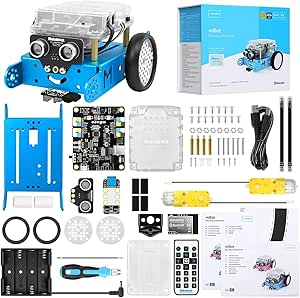 | Best for Beginners | Brand: Makeblock | Model: 90053 | Recommended age: 8 years and up | VIEW LATEST PRICE | See Our Full Breakdown |
| Sillbird 12-in-1 Solar Robot Building Kit, 190 Pieces |  | Best for Renewable-Energy Basics | Brand: Sillbird | Models: 12 | Piece count: 190 | VIEW LATEST PRICE | See Our Full Breakdown |
| Sillbird 5-in-1 Programmable STEM Robot Building Kit with App and Remote Control, 488 Pieces |  | Best for Multi-Model App Play | Brand: Sillbird | Model: B883 | Pieces: 488 | VIEW LATEST PRICE | See Our Full Breakdown |
| Butterfly EduFields 10-in-1 STEM Robotics Electronics Kit for Kids Ages 8–12 |  | Best for Robotics and Electronics Variety | Brand: Butterfly EduFields | Model number: 506 | Projects: 10 | VIEW LATEST PRICE | See Our Full Breakdown |
| Butterfly EduFields 40-in-1 STEM Robotics Kit for Kids |  | Best for Electronics Variety | Recommended age: 8–17 years | Components: 100+ | Projects: 40+ | VIEW LATEST PRICE | See Our Full Breakdown |
| EggTailz Smart Robot Car Kit for Kids Ages 8+ |  | Best for Interactive Driving | Recommended age: 8 years and up | Drive system: 2WD | Control modes: Auto-go and remote control | VIEW LATEST PRICE | See Our Full Breakdown |
| ACIKETO 6-in-1 STEM Robot Building Kit with App and Remote Control, 780 Pieces |  | Best for App-Based Coding | Recommended age: 8 years and up | Pieces: 780 | Build options: 6 robot and vehicle models | VIEW LATEST PRICE | See Our Full Breakdown |
| ANNISOKA DIY Wooden Robot Arm STEM Kit |  | Best for Mechanical Motion | Recommended age: 8 years and up | Material: Wood | Power requirement: 6 AA batteries, not included | VIEW LATEST PRICE | See Our Full Breakdown |
| Bottleboom 13-in-1 Solar-Powered Robot Kit for Kids Ages 8–15 |  | Best Solar-Powered Pick | Recommended age: 8–15 years | Robot builds: 13 | Power source: Solar | VIEW LATEST PRICE | See Our Full Breakdown |
| BeAndge 6-in-1 Robotics STEM Kit for Kids Ages 8–12 |  | Best for Variety in One Kit | Brand: BeAndge | Project count: 6-in-1 | Included projects: Reptile robot, balance car, bubble machine, fiber lamp, buzzer wire game | VIEW LATEST PRICE | See Our Full Breakdown |
| Smartivity Robotic Mechanical Hand STEM Building Kit for Kids Ages 8–14 |  | Best for Mechanical Learning | Brand: Smartivity | Model: SMRT1135 | Recommended age: 8–14 years | VIEW LATEST PRICE | See Our Full Breakdown |
| educational robotics kits for kid | Recommended age | Brand | Material |
|---|---|---|---|
| ELEGOO UNO R3 Smart Robot Car | 12 years and up | — | — |
| Makeblock mBot STEM Coding Rob | 8 years and up | Makeblock | — |
| Sillbird 12-in-1 Solar Robot B | 10 years and up | Sillbird | ABS |
| Sillbird 5-in-1 Programmable S | 8–16 years | Sillbird | — |
| Butterfly EduFields 10-in-1 ST | 8–17 years | Butterfly EduFields | — |
| Butterfly EduFields 40-in-1 ST | 8–17 years | — | Wood |
| EggTailz Smart Robot Car Kit f | 8 years and up | — | — |
| ACIKETO 6-in-1 STEM Robot Buil | 8 years and up | — | ABS |
| ANNISOKA DIY Wooden Robot Arm | 8 years and up | — | Wood |
| Bottleboom 13-in-1 Solar-Power | 8–15 years | — | Non-toxic ABS |
| BeAndge 6-in-1 Robotics STEM K | 8–14 years | BeAndge | — |
| Smartivity Robotic Mechanical | 8–14 years | Smartivity | Engineered wood |
More Details on Our Top Picks
ELEGOO UNO R3 Smart Robot Car Kit V4 with Camera
The ELEGOO UNO R3 is the strongest choice here for kids ready to move from assembling a robot to programming one. Its Arduino IDE support gives learners room to experiment with code, while the camera’s live FPV video, line tracking, and obstacle avoidance make changes visible in how the car behaves. Compared with the Makeblock mBot, it offers a camera-based feature set and a more involved build, but the mBot is a more approachable starting point for younger children, with a quicker assembly process and Scratch support. The ELEGOO’s guided instructions and sample programs help, though first-time builders may still need adult help. Choose it for a sustained coding project; skip it if you want a quick, low-effort introduction.
Pros:- Arduino IDE compatibility supports open-ended coding projects.
- Camera module adds live FPV video to the car’s interactive features.
- Line tracking and obstacle avoidance let kids explore sensor-driven behavior.
- Guided assembly instructions and example programs provide a starting point.
Cons:- Assembly and programming can be demanding for a first-time builder.
- Adult guidance may be needed, especially during setup and coding.
- The camera and Wi-Fi module add complexity compared with simpler beginner kits.
Best for: Families with children 12 and up who want an Arduino-compatible car for hands-on coding, camera experiments, and sensor-based robotics.
Not ideal for: Younger beginners or families seeking a fast build with minimal adult support; assembly and programming take time, and the listed age recommendation is 12 and up.
- Controller:ELEGOO UNO R3
- Programming platform:Arduino IDE
- Camera and Wi-Fi module:ESP32-WROVER-based
- Control methods:App and IR remote
- Features:FPV video, line tracking, obstacle avoidance, and auto follow
- Battery:2000 mAh rechargeable lithium-ion
- Recommended age:12 years and up
- Dimensions:8 x 7 x 6 inches
Our verdict“Choose the ELEGOO for an older beginner who wants Arduino coding and camera features, not the simplest first robot.”
Makeblock mBot STEM Coding Robot Kit for Kids Ages 8–12
The Makeblock mBot is the most direct starting point in this group for a child new to robotics. Its about-15-minute assembly lowers the barrier to getting a working robot, and Scratch, mBlock, and Arduino give families a path from introductory coding toward more advanced projects. Line following, obstacle avoidance, and remote control connect those lessons to visible robot behavior. Compared with the ELEGOO UNO R3 Smart Robot Car, the mBot is less focused on camera features and a more advanced build, but its shorter setup and Scratch support suit younger beginners better. The tradeoff is that the robot needs four AA batteries and the remote needs a CR2025, neither included. Some coding features also rely on apps or software, so it is not a fully self-contained activity.
Pros:- About 15 minutes of assembly makes the first build approachable.
- Scratch, mBlock, and Arduino support different stages of coding learning.
- Line-following and obstacle-avoidance functions connect code to movement.
- Tutorials and compatible apps support guided learning.
Cons:- Four AA batteries and a CR2025 remote battery are not included.
- Some programming features depend on apps or software.
- Offers a simpler feature set than the ELEGOO camera-equipped robot car.
Best for: Families with children around ages 8–12 seeking a quick first build with an accessible route from Scratch coding toward Arduino.
Not ideal for: Buyers who want everything needed to run the robot in the box, or older learners seeking camera-based features and a more involved coding challenge.
- Brand:Makeblock
- Model:90053
- Recommended age:8 years and up
- Programming platforms:Scratch, Arduino, and mBlock
- Assembly time:About 15 minutes
- Robot batteries:4 AA batteries, not included
- Remote battery:CR2025, not included
- Included components:Robot kit
Our verdict“Pick the mBot for a younger beginner who values quick assembly and Scratch support over camera features or a longer build.”
Sillbird 12-in-1 Solar Robot Building Kit, 190 Pieces
The Sillbird 12-in-1 is the clearest fit for families who want building and renewable-energy lessons rather than programmable control. Its 12 models from 190 pieces invite repeated construction, and running on sunlight or a strong artificial light source gives kids a tangible introduction to solar power. That makes it distinct from the Makeblock mBot, which teaches coding through sensors and software, and the ELEGOO robot car, which adds Arduino programming and FPV video. Sillbird is less suitable if a child expects app control, coding exercises, or reliable operation regardless of lighting. Bright light is required, and some models may challenge younger builders even with step-by-step instructions. The value here is variety in mechanical builds and an energy concept, not a programmable robot platform.
Pros:- Twelve model options provide repeated building challenges from one kit.
- Solar operation introduces renewable-energy concepts through direct use.
- Step-by-step instructions guide assembly.
- Can use sunlight or a strong artificial light source.
Cons:- Needs bright sunlight or strong artificial light to operate.
- Some builds may be difficult for younger children.
- Does not offer the coding platforms or app control found in the mBot and ELEGOO car.
Best for: Families with children 10 and up who enjoy rebuilding models and want a hands-on introduction to solar power without an emphasis on coding.
Not ideal for: Kids looking for app control, programmable behaviors, or play that works consistently indoors regardless of available light.
- Brand:Sillbird
- Models:12
- Piece count:190
- Power source:Sunlight or strong artificial light
- Recommended age:10 years and up
- Material:ABS
- Batteries:No battery included
- Dimensions:10.24 x 7.87 x 2.56 inches
Our verdict“Choose this kit for solar-powered model building and energy lessons, not for children whose main goal is learning to program a robot.”
Sillbird 5-in-1 Programmable STEM Robot Building Kit with App and Remote Control, 488 Pieces
This Sillbird kit suits kids who want one set of parts to become several different remote-controlled builds. With 488 pieces and five models, including a robot, dinosaur, car, and tank, it leans more toward construction variety than the focused coding path of the Makeblock mBot. Bluetooth app control, a remote, basic programming, and path control add a first taste of directing a build, while the rechargeable battery avoids the separate AA batteries required by the mBot. The compromise is that the kit’s programming is described as basic, so it may not satisfy a learner looking for the Arduino depth of the ELEGOO UNO R3. Up to 40 minutes of play per charge also means sessions need charging breaks, and assembly takes patience.
Pros:- 488 pieces support five different builds, including a robot, dinosaur, car, and tank.
- Bluetooth app and remote control offer two ways to operate the models.
- Basic programming and path control introduce simple command-based behavior.
- Rechargeable battery avoids buying separate robot batteries.
Cons:- Up to 40 minutes of play per charge may limit longer sessions.
- Assembly takes time and patience.
- Basic programming offers less depth than the Arduino-supported ELEGOO car.
Best for: Families with children ages 8–16 who want a substantial build set with multiple models, app or remote control, and introductory programming.
Not ideal for: Learners seeking a dedicated coding curriculum or extended play without charging pauses; the programming is basic and battery life is up to 40 minutes per charge.
- Brand:Sillbird
- Model:B883
- Pieces:488
- Buildable models:5, including a robot, dinosaur, car, and tank
- Control methods:Bluetooth app and remote control
- Features:Basic programming and path control
- Battery life:Up to 40 minutes per charge
- Recommended age:8–16 years
Our verdict“Pick this Sillbird set for varied builds and accessible app-controlled play, rather than a deeper programming curriculum.”
Butterfly EduFields 10-in-1 STEM Robotics Electronics Kit for Kids Ages 8–12
The Butterfly EduFields 10-in-1 is a good match for kids who want to try several small robotics and electronics projects rather than focus on one programmable car. Its 100-plus components and 10 projects give learners a chance to explore mechanics, wires, switches, connectors, and LED lights, with line-following and obstacle-avoidance functions among the robotics examples. The illustrated manual makes it more guided than the Sillbird solar kit, whose main lesson centers on light-powered builds, while the Makeblock mBot offers a clearer route into Scratch coding. Butterfly EduFields’ appeal is breadth across hands-on projects, not a stated coding platform or app-controlled system. The product description notes some projects may take about 15 minutes to assemble, but does not specify power requirements or how much adult help each build needs.
Pros:- Ten projects offer variety across robotics and electronics.
- More than 100 components expose learners to wires, switches, connectors, and LEDs.
- Illustrated step-by-step instructions support guided assembly.
- Line-following and obstacle avoidance introduce interactive robot behaviors.
Cons:- No specific programming platform is listed, unlike the Makeblock mBot.
- Power requirements are not provided in the supplied product details.
- The time needed and adult support required may vary between projects.
Best for: Families with children ages 8–12 who want a range of guided robotics and basic electronics builds, including sensor-based functions.
Not ideal for: Kids specifically seeking a Scratch or Arduino curriculum, or buyers who need clear information about power requirements and setup for each project.
- Brand:Butterfly EduFields
- Model number:506
- Projects:10
- Components:100+
- Recommended age:8–17 years
- Included components:Wires, switches, connectors, and LED lights
- Instruction format:Illustrated, step-by-step manual
- Robot functions:Line-following and obstacle avoidance
Our verdict“Choose Butterfly EduFields for a broad, guided introduction to robotics and electronics, but choose the mBot if Scratch coding is the priority.”
Butterfly EduFields 40-in-1 STEM Robotics Kit for Kids
The 40-plus project range makes this a strong choice for kids who want to explore sensors and simple automation, not just build one moving vehicle. Its 100-plus plug-and-play components cover projects such as a line-following car, drawing robot, and hand water dispenser, giving families more ways to connect each build to a practical STEM idea. Unlike the EggTailz Smart Robot Car, which centers on driving and obstacle avoidance, this kit spreads attention across different electronics projects and needs no soldering or coding. That also makes its learning path more guided than the app-based programming options in the ACIKETO 6-in-1. The tradeoff is that it depends on separately supplied AA batteries, and the holder is not compatible with Duracell batteries. Its broad project count also means more assembly and instruction-following than a focused single-build kit.
Pros:- More than 40 projects offer varied practice with robotics and home automation.
- Over 100 components and reusable sensors support different types of builds.
- Plug-and-play assembly avoids soldering and coding requirements.
- Detailed instructions and concept manuals help structure learning.
Cons:- AA batteries are required and must be supplied separately.
- Duracell batteries are incompatible with the included battery holder.
- The number of projects can mean more setup and instruction-following than a single-purpose kit.
Best for: Families seeking a guided introduction to sensors, circuits, and home-automation projects for children ages 8–17.
Not ideal for: Kids who want app-based coding or a ready-to-drive car, and families who already rely on Duracell AA batteries.
- Recommended age:8–17 years
- Components:100+
- Projects:40+
- Sensors:IR, flame, touch, LDR, and others
- Battery requirement:AA batteries; Duracell batteries are not compatible with the included holder
- Material:Wood
- Dimensions:8 x 5 x 1 inches
- Weight:0.8 kg
Our verdict“Choose this kit for broad, guided electronics exploration; pick EggTailz instead if the main goal is driving a robot car.”
EggTailz Smart Robot Car Kit for Kids Ages 8+
For a child who wants to build a vehicle and then see it react, the EggTailz Smart Robot Car offers a more focused experience than the multi-project Butterfly EduFields 40-in-1. Its two-wheel-drive car has both remote-control and autonomous modes, while ultrasonic obstacle avoidance gives the autonomous setting a clear robotics concept to observe. Self-balancing and lights add variety to play, though they do not replace the broader electronics projects offered by Butterfly. A rechargeable battery provides a stated one to four hours of play after a two-hour charge, which avoids replacing batteries in the car itself. Beginners may need adult help during assembly, and the remote still needs two AA batteries. Kids seeking app-based path coding would be better matched to the ACIKETO 6-in-1; EggTailz is primarily about building, steering, and sensing obstacles.
Pros:- Combines autonomous cruising with remote control.
- Ultrasonic obstacle avoidance gives kids a visible example of sensor-based behavior.
- Rechargeable car battery provides a stated one to four hours of play.
- Self-balancing and lights add distinct features to the car build.
Cons:- Beginners may need parent assistance during assembly.
- The remote requires two AA batteries.
- Its focus on one robot car offers less build variety than the Butterfly EduFields 40-in-1.
Best for: Children ages 8 and up who want to assemble a robot car and switch between hands-on remote driving and autonomous movement.
Not ideal for: Independent first-time builders who need especially simple assembly, or families looking for broad sensor experiments or app-based coding.
- Recommended age:8 years and up
- Drive system:2WD
- Control modes:Auto-go and remote control
- Obstacle avoidance:Ultrasonic radar
- Car battery:Rechargeable
- Remote batteries:2 AA batteries included
- Charging time:2 hours
- Playtime:1–4 hours
Our verdict“Pick EggTailz for a build-and-drive robotics experience, but choose ACIKETO for a wider range of models and app-based coding modes.”
ACIKETO 6-in-1 STEM Robot Building Kit with App and Remote Control, 780 Pieces
The ACIKETO 6-in-1 suits kids who want construction and digital control in the same kit. Its 780 pieces can form six robot and vehicle designs, while the app adds driving, gravity, path-coding, and programming modes. That gives it a more explicit route into coding than the EggTailz Smart Robot Car, whose controls focus on remote driving and autonomous car behavior. Compared with the Butterfly EduFields 40-in-1, ACIKETO offers fewer project types but puts more emphasis on rebuilding a substantial block model and controlling it through an app or 2.4 GHz remote. The main limitation is that only one model can be built at a time, so kids must take apart a finished build to try another. It is also a larger assembly commitment than a focused wooden robot arm project.
Pros:- 780 pieces support detailed construction and rebuilding.
- Six robot and vehicle models provide multiple build targets.
- App modes include path coding and STEM programming.
- Both 2.4 GHz remote control and mobile app control are included.
Cons:- Only one model can be assembled at a time.
- The app-based experience depends on using a compatible mobile device.
- Its six build options offer less project variety than the Butterfly EduFields 40-in-1.
Best for: Builders ages 8 and up who enjoy substantial block builds and want to try app-based path coding alongside remote control.
Not ideal for: Kids who want to keep several models assembled at once, or families seeking sensor-focused electronics experiments without an app.
- Recommended age:8 years and up
- Pieces:780
- Build options:6 robot and vehicle models
- Control options:2.4 GHz remote and mobile app
- App modes:Driving simulation, gravity control, path coding, STEM programming
- Battery:Rechargeable
- Material:ABS
- Included components:780 blocks and instruction manual
Our verdict“Choose ACIKETO for a substantial rebuildable kit with app programming; skip it if you want multiple models ready to play at once.”
ANNISOKA DIY Wooden Robot Arm STEM Kit
The ANNISOKA wooden robot arm is the most focused choice here for children curious about how motors and mechanical movement work together. Rather than offering the vehicle variety of the Bottleboom 13-in-1 Solar Robot Kit or the sensor experiments in the Butterfly EduFields 40-in-1, it centers the learning on assembling and operating one arm. Wooden pieces, a motor, microcontroller board, and wires give the build a tangible connection between a circuit and movement, and no soldering is required. That narrow focus can be useful for a child who wants to study one mechanism rather than cycle through many models. The tradeoff is limited build variety, plus a requirement for six AA batteries that are not included. Younger builders may also need help with assembly, making this less suitable as a fully independent first project.
Pros:- Connects circuit components and motor-driven mechanical movement in one build.
- Wooden pieces make the arm’s physical structure easy to see.
- No soldering is required.
- The focused project encourages problem-solving and fine motor practice.
Cons:- Requires six AA batteries, which are not included.
- Assembly may challenge younger children without adult help.
- A single arm build offers less model variety than the Bottleboom 13-in-1.
Best for: Children ages 8 and up who are interested in motors, circuits, and the mechanics of a moving arm, with an adult available to help.
Not ideal for: Kids who want multiple robot designs, app coding, or a low-prep kit that does not require buying batteries separately.
- Recommended age:8 years and up
- Material:Wood
- Power requirement:6 AA batteries, not included
- Soldering:Not required
- Included components:Robot arm kit with motors, microcontroller board, wires, wooden pieces, and instructions
- Dimensions:6.8 x 4.48 x 4.3 inches
- Educational objectives:Creative skills, logical thinking, motor skills, problem-solving, and STEM
Our verdict“Choose ANNISOKA for a focused introduction to motorized mechanisms, not for a kit built around multiple vehicles or coding.”
Bottleboom 13-in-1 Solar-Powered Robot Kit for Kids Ages 8–15
The Bottleboom 13-in-1 gives solar power a central role, making it a good fit for kids who want to explore energy through rebuilding rather than app programming. Its reusable parts can be taken apart and assembled into 13 designs, including robots for movement on land or water. That gives it more model variety than the single-project ANNISOKA robot arm, while keeping the lesson simpler and more physical than the app-based coding modes in the ACIKETO 6-in-1. A step-by-step manual supports the build, but assembly can still be challenging for some children. Solar operation also depends on access to sufficient light, so play may be less predictable indoors or in poor lighting. This kit favors hands-on experimentation with energy and motion over sensors, remote control, or programmable behavior.
Pros:- Thirteen designs provide more rebuilding options than a single-model kit.
- Reusable parts can be disassembled and used in other builds.
- Solar power introduces an accessible energy concept through hands-on play.
- Step-by-step instructions support parent-child building.
Cons:- Solar-powered operation depends on sufficient light.
- Assembly may be difficult for some children without help.
- It does not offer the app coding and remote-control options found in ACIKETO.
Best for: Children ages 8–15 who want to rebuild several moving robots and learn about solar energy with adult support as needed.
Not ideal for: Families seeking reliable operation regardless of lighting, or kids who want remote control, app coding, or detailed sensor projects.
- Recommended age:8–15 years
- Robot builds:13
- Power source:Solar
- Material:Non-toxic ABS
- Included components:Solar-powered robot parts
- Model:2115A
- Number of packs:1
Our verdict“Choose Bottleboom for varied rebuilds and a solar-energy lesson, but pick ACIKETO if app-based programming matters more than light-powered play.”
BeAndge 6-in-1 Robotics STEM Kit for Kids Ages 8–12
Six different builds make this a good fit for children who like changing projects rather than returning to one robot repeatedly. The reptile robot and balance car bring moving mechanisms into the mix, while the bubble machine, fiber lamp, and buzzer wire game offer different kinds of hands-on science play. Compared with the Smartivity Robotic Mechanical Hand, which centers on one mechanical build, BeAndge offers more project variety but less focus on a single mechanism. Step-by-step instructions and an included mini screwdriver help make assembly more approachable for ages 8–14. The tradeoff is that this is not a ready-to-run kit: AA batteries and bubble solution are sold separately, and the provided project list does not specify app-based programming. Choose it for varied building activities, not for a dedicated coding experience.
Pros:- Six projects offer more activity variety than a single-build kit
- Includes a mini screwdriver and step-by-step instructions
- Mixes moving builds with light, sound, and bubble activities
- Projects encourage problem-solving through assembly
Cons:- AA batteries and bubble solution are not included
- The listed projects emphasize building and experiments rather than a defined coding curriculum
Best for: Families seeking several different hands-on STEM activities for children ages 8–14, especially kids who enjoy switching between mechanical and light or sound projects.
Not ideal for: Buyers looking for an app-connected or clearly programming-focused robot, or families who want every required supply included.
- Brand:BeAndge
- Project count:6-in-1
- Included projects:Reptile robot, balance car, bubble machine, fiber lamp, buzzer wire game
- Recommended age:8–14 years
- Educational skills:Coding, motor skills, problem solving, STEM
- Batteries:AA batteries required; not included
- Bubble solution:Not included
- Warranty:Lifetime warranty against manufacturer defects
Our verdict“Choose BeAndge for a varied set of hands-on STEM builds, but pick a dedicated coding robot if programming is the main goal.”
Smartivity Robotic Mechanical Hand STEM Building Kit for Kids Ages 8–14
The mechanical hand gives this kit a focused purpose: children assemble a wooden model that connects robotics-themed play with anatomy and mechanical movement. Its screen-free format and step-by-step instructions suit kids who prefer building a tangible mechanism over working through app-based controls. Compared with the BeAndge 6-in-1 Robotics STEM Kit, Smartivity offers just one central project, but that narrower scope can make the build feel more cohesive rather than a sequence of unrelated activities. Engineered wood and a lifetime supply of replacement parts support continued use if components need replacing. The tradeoff is limited replay variety: this is a single assembly project, not a collection of robots or a stated coding curriculum. It also requires assembly and is intended for ages 8–14, so younger children may need another option.
Pros:- Focused mechanical-hand build connects robotics with anatomy
- Screen-free construction and play
- Step-by-step instructions guide assembly
- Lifetime supply of replacement parts supports continued use
Cons:- Offers one main project rather than multiple builds
- Requires assembly and may need adult help depending on the child
- Does not specify app controls or a coding curriculum
Best for: Families with children ages 8–14 who want a screen-free build centered on how a mechanical hand works, with replacement parts available over time.
Not ideal for: Kids who want multiple projects, app-based coding, or a ready-to-play robot without an assembly step.
- Brand:Smartivity
- Model:SMRT1135
- Recommended age:8–14 years
- Material:Engineered wood
- Theme:Robotics, anatomy
- Unit count:1
- Dimensions:11.81 x 9.8 x 3.5 inches
- Replacement parts:Lifetime supply
Our verdict“Choose Smartivity for a focused, screen-free mechanical build; choose BeAndge instead when project variety matters more.”
How We Picked
I compared these kits as learning tools rather than piece-count contests. The main criteria were what children can learn through building and play, whether coding or electronics are part of the experience, how clearly the kit supports progression, and how well its format suits the listed age range. I also weighed project variety, likely adult assistance, and whether the central activity can hold a child’s interest after the first assembly.
The ranking favors kits that balance accessible first steps with room to learn more. That puts the mBot ahead as a broadly approachable combination of building and coding, while the ELEGOO ranks as a better fit for learners ready for more technical control. Solar and multi-model kits can be appealing for hands-on variety, but they rank lower when the learning path is less centered on programming. Specialized mechanical builds earn a place for focused interests, not as substitutes for a coding curriculum.
| educational robotics kits for kid | Brand | Material |
|---|---|---|
| ELEGOO UNO R3 Smart Robot Car | — | — |
| Makeblock mBot STEM Coding Rob | Makeblock | — |
| Sillbird 12-in-1 Solar Robot B | Sillbird | ABS |
| Sillbird 5-in-1 Programmable S | Sillbird | — |
| Butterfly EduFields 10-in-1 ST | Butterfly EduFields | — |
| Butterfly EduFields 40-in-1 ST | — | Wood |
| EggTailz Smart Robot Car Kit f | — | — |
| ACIKETO 6-in-1 STEM Robot Buil | — | ABS |
| ANNISOKA DIY Wooden Robot Arm | — | Wood |
| Bottleboom 13-in-1 Solar-Power | — | Non-toxic ABS |
| BeAndge 6-in-1 Robotics STEM K | BeAndge | — |
| Smartivity Robotic Mechanical | Smartivity | Engineered wood |
Factors to Consider When Choosing Educational Robotics Kits For Kids
Before choosing, decide what you want the child to learn and how they prefer to work. A robot that moves across the floor can be exciting, but it is not automatically a better coding lesson than a stationary mechanical build. These factors help separate a kit that matches your child from one that looks appealing but sits unfinished.
Choose the Learning Goal Before the Robot
Start by choosing between coding, electronics, mechanics, and open-ended construction. A programmable car makes movement and control visible, while a robotic hand can explain linkages and how input creates motion. Solar kits add an energy theme, though the main activity may be building rather than writing code. A common mismatch is buying a kit for its robot shape when the child is more interested in making things or solving logic problems. Pick the skill that will sustain curiosity after the first build, then use that goal to compare options.
Match the Coding Interface to the Learner
For a first coding experience, look for clear, guided steps and a way to see how a small change affects the robot. App-based or block-based control can lower the barrier, while Arduino-style programming offers more room to work with sensors and code but can require more patience. Check what device, software, and connection method the kit needs before buying; a child may be unable to start if the family lacks a compatible device. Avoid treating a coding label as proof that the kit teaches programming in depth. Consider whether instructions explain why a command works, not just which button to press.
Plan for Assembly Time and Adult Support
Assembly can be part of the lesson, but the amount of help needed varies widely. Small electronic connections, dense instructions, and long builds may frustrate a younger child who wants a quick result. Check whether the kit’s age guidance reflects independent assembly or supervised use, and think about how much time an adult can spend troubleshooting. For a first project, a simpler build that reaches a working robot quickly can protect enthusiasm. Save more involved construction for children who enjoy careful, step-by-step work.
Look Past the Number of Models
A high model count can mean more ways to rebuild, but it does not tell you how much each model teaches. Some kits make repeated construction the main attraction; others have fewer builds but a clearer path from assembly to programming and testing. Check whether the models use genuinely different mechanisms or mainly rearrange the same pieces. Also consider whether instructions support experimentation beyond the pictured designs. If your child likes switching projects often, variety matters; if they prefer mastering one system, depth and clear progression may matter more.
Check What Powers the Projects
Power source affects where and how a child can use the kit. Solar-powered builds depend on suitable light, so indoor conditions and local weather can limit when they operate as intended. Battery-powered or USB-connected robots may be easier to run on demand, but check whether batteries are included and how they are replaced or recharged. A project that cannot be powered quickly can interrupt a child’s learning session. Match the power setup to the space where the kit will usually be built and tested.
Decide Whether You Want One Kit or a Learning Path
A single kit can be a good first experience, but continued learning depends on what comes after the build. Look for opportunities to change commands, test different inputs, rebuild components, or add new challenges. Before choosing a technically demanding kit, consider whether the child has the patience and support to work through setup and errors. Paying more for complexity makes sense only when the child is ready to use that extra capability. For a younger beginner, a clear first success may be more useful than features they will not yet use.
Frequently Asked Questions
Which robotics kit is a sensible first choice for a child who has never coded?
I would start with a kit that pairs a manageable build with guided, visible robot behavior, rather than choosing the most technically advanced option. The mBot is the strongest all-round starting point in this group, while construction-focused kits can suit children more interested in making than programming. Check whether the child can follow the instructions with the amount of adult help available at home. A small early success can matter more than a long list of features.
Should I choose a solar-powered kit or a programmable robot car?
Choose a solar kit when the child’s interest is mainly building models and exploring how light can power movement. A programmable car is a better fit when the goal is to experiment with commands, movement, and control. Solar performance can depend on the light available, so it may be less convenient for indoor play. A car kit may require batteries or a compatible device, so check its setup needs too.
Is an Arduino-style kit too advanced for an elementary-age child?
Not automatically, but age alone does not predict readiness. Comfort with following detailed instructions, handling small components, and working through errors matters as much as the number on the box. An adult may need to help with assembly or explain electronics concepts at first. If the child wants quick independent play, a more guided coding robot may be a better start; if they enjoy technical challenges, Arduino-style control can offer room to grow.
Do multi-in-one kits teach more than a single-purpose robot?
They teach more only if the different builds give the child meaningful chances to explore new mechanisms or ideas. A larger model count can encourage rebuilding, but it may not provide the same depth in coding as a focused programmable robot. Check the instructions and project structure rather than relying on the number of designs alone. For a child who likes variety, multiple builds can help maintain interest; for a child who wants to program, a focused kit may be a better teacher.
What should I check before buying a robotics kit as a gift?
Confirm the child’s age and interests, then check device compatibility, power requirements, and adult-help needs. A kit that depends on an app or a particular type of device may not be ready to use in every household. Look at whether batteries are supplied and whether assembly is likely to fit the child’s patience. If the child has not built a robot before, choose for a clear first project rather than maximum complexity. Keeping the setup simple makes it more likely the gift gets used soon.
Conclusion
Best overall: I recommend the Makeblock mBot for families who want an approachable mix of building and coding. Best value: The Sillbird 12-in-1 Solar Robot Building Kit suits buyers looking for hands-on model variety and a solar-powered theme. Best premium: Choose the ELEGOO UNO R3 Smart Robot Car Kit if the child is ready for a more technical Arduino-style project. Best for beginners: The mBot is the clearest starting point for a child who wants a working robot and guided programming. Best for specific needs: Pick the Smartivity Robotic Mechanical Hand or ANNISOKA Wooden Robot Arm for mechanical motion, and consider a multi-model Sillbird or Butterfly EduFields kit when rebuilding variety matters more than coding depth. Match the kit to the child’s main interest and the level of support available, and the choice becomes much clearer.